Control PowerPoint from your phone
Open your slides full screen on any computer, scan a QR code, and your phone becomes the remote. Next and previous are under your thumb, and your speaker notes follow the slide. No app, no cable, no clicker to forget.
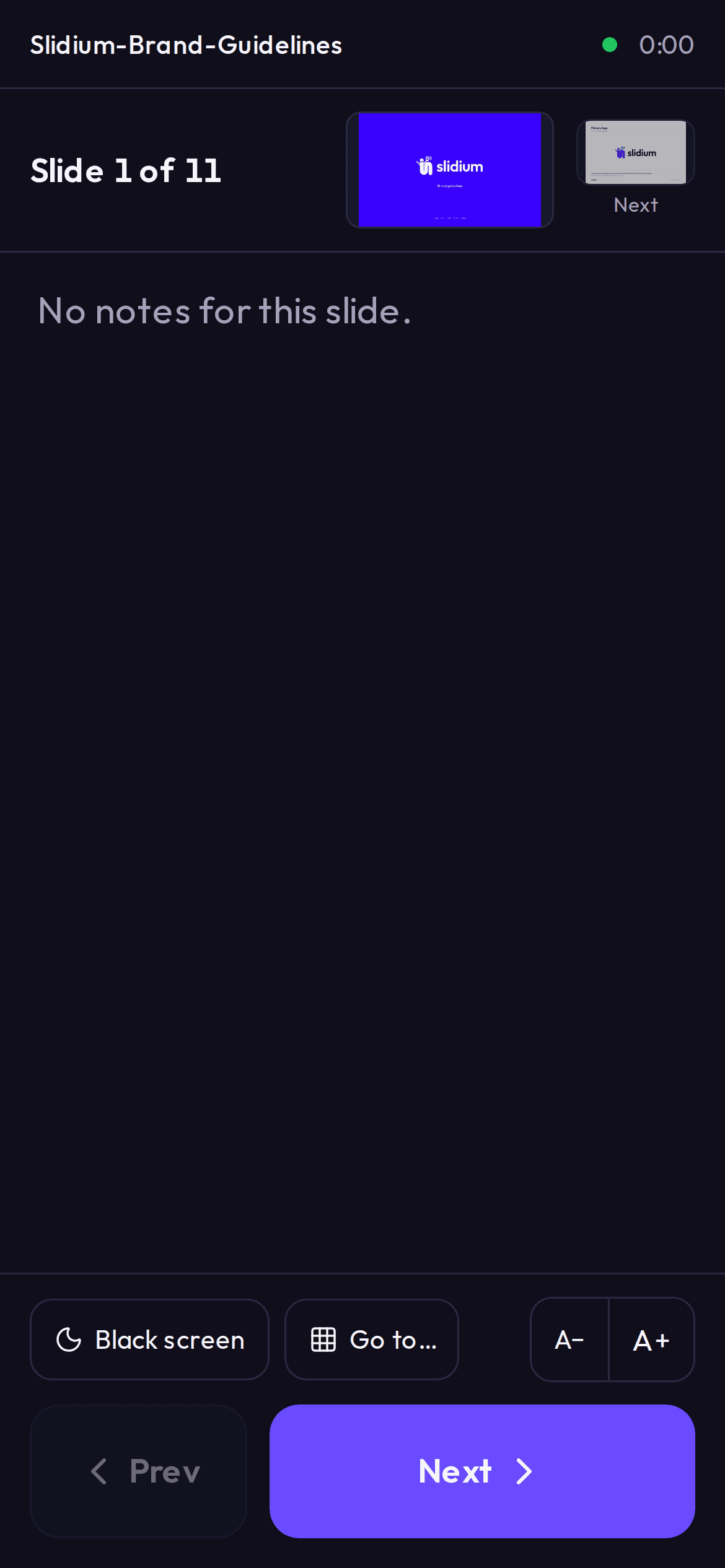
How to use your phone as a remote
- 1
Upload your presentation
PowerPoint (.pptx) or PDF. PowerPoint notes are imported with it.
- 2
Open it in Present mode
On the computer connected to the screen or projector. A QR code appears.
- 3
Scan the code with your phone
Use the camera. The phone opens the remote in the browser, no app and no account.
- 4
Present
Tap Next and Previous. The big screen shows only the slides; your notes stay on your phone.
What you see on your phone
- Large Next and Previous buttons, easy to hit without looking
- Your speaker notes for the current slide, with adjustable text size
- The slide number and a preview of the next slide
- A timer, so you know how long you have been talking
- Black screen, to pause the audience's attention on you
- Go to any slide from a grid of thumbnails
Why use your phone instead of a clicker
- You always have it
- No batteries, no USB receiver, nothing to borrow from the venue.
- Your notes come with it
- A clicker only changes slides. Your phone also shows what you planned to say.
- Nothing to install
- It runs in the browser on the computer and on the phone, so it works on a room PC you have never seen.
- You decide who controls it
- Only phones that scan your code connect, up to 3 per presentation. You can disconnect any of them from the computer.
Questions
Do I need to install an app on my phone?
No. Scan the QR code with your camera and the remote opens in your phone's browser. It works on iPhone and Android.
Do the phone and the computer need to be on the same Wi-Fi?
No. The phone talks to Slidium over the internet, so Wi-Fi or mobile data both work, even if the venue network is restricted.
Can the audience see my notes?
No. The big screen shows only the slides. Your notes are only on your phone.
Does it work with PDF files?
Yes. PDFs have no notes of their own, so you write them in Slidium, slide by slide, before you present.
Is it free?
Yes. The phone remote and speaker notes are included in the free plan.
Learn more
How to control a PowerPoint presentation from your phone
Three ways to use your phone as a PowerPoint remote, what each needs, and how to set one up in under a minute with no app.
4 min read
Presenter view with only one screen: how to see your notes
PowerPoint's presenter view needs a second display. Here is how to keep your speaker notes private when you only have the projector.
4 min read
How many slides for a 10-minute presentation?
A practical way to decide how many slides you need for a 10-minute talk, and how to check your timing before the real thing.
5 min read
Try it with your own slides
Upload a PowerPoint or PDF and control it from your phone in under a minute. Free plan, no credit card.
Start free